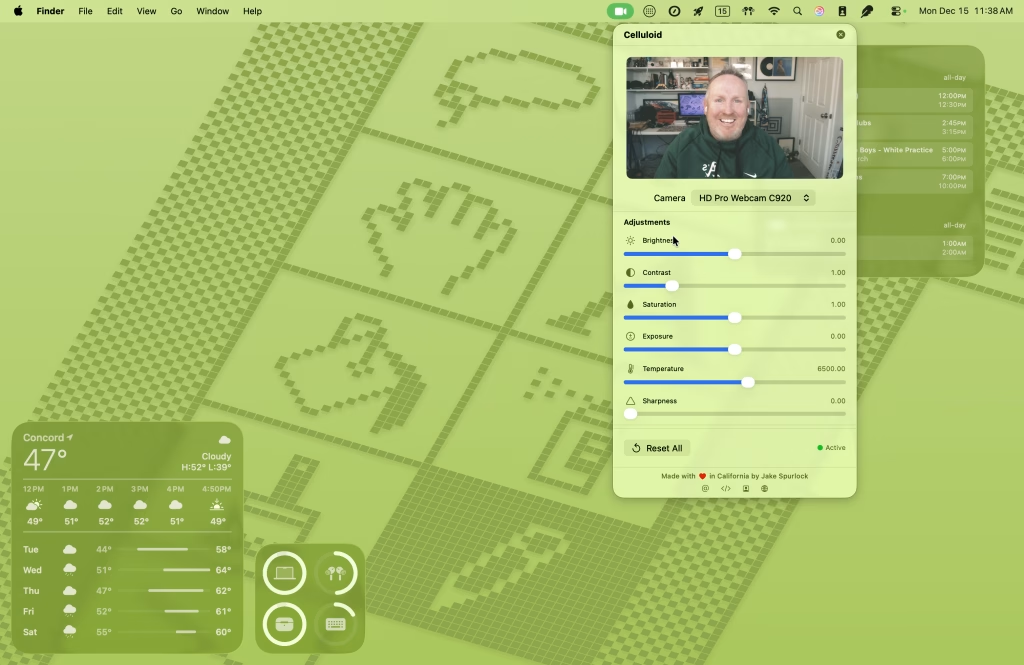
Celluloid: A Virtual Camera App for macOS
I’ve had a Logitech C920 webcam for years. It’s a solid camera, but I’ve always hated its color grading — it pushes everything red, making me look perpetually sunburned on video calls.
Zoom has a “Touch up my appearance” filter that helped a bit, but most of my calls happen in Google Meet, which doesn’t have anything comparable. I wanted a solution that worked across all my video apps — set it once and forget it.
So I built one.
Introducing Celluloid – Camera Filters
Celluloid is a macOS menu bar app that creates a virtual camera with real-time filters and color adjustments. Select “Celluloid Camera” in any video app — Zoom, Google Meet, FaceTime, Microsoft Teams, OBS — and your enhanced video just works.
Features include:
- Film-inspired filters — Black Mist (dreamy diffusion), Halation (vintage highlight bloom), Gate Weave (film projector movement), plus classics like Noir and Chrome
- Color controls — Brightness, contrast, saturation, exposure, color temperature, and sharpness
- Built-in LUTs — Professional color grades ready to use, including one specifically tuned to fix the Logitech C920’s color issues
- Battery friendly — The camera only activates when an app is actually using it
- Privacy focused — All processing happens locally on your Mac. No data collected or transmitted.
How It Works
Celluloid uses Apple’s CMIOExtension framework to register a virtual camera device with macOS. The main app captures video from your physical webcam, applies filters using Core Image and custom Metal shaders, then sends the processed frames to the camera extension via CoreMediaIO sink streams.
The technical journey was interesting — I tried several IPC approaches (file-based sharing, CFPreferences, shared memory) before landing on sink streams, which turned out to be the correct approach for CMIOExtensions running in their restricted sandbox.
Some technical highlights:
- SwiftUI for the interface
- AVFoundation for camera capture
- Metal-backed CIContext for GPU-accelerated filter processing
- Custom Metal shaders for the Black Mist diffusion effect
- CVPixelBufferPool for efficient buffer reuse
- Darwin notifications for IPC between the app and extension
Get It
Celluloid – Camera Filters is available now on the Mac App Store.
The code is open source on GitHub.
If you’ve ever wished you could look a little better on video calls without buying studio lighting, give it a try. And if you have ideas for new filters or LUTs, I’d love to hear them.
#app #development #MacOS #NerdyStuff #Swift #SwiftUI