
If you are on a Windows 11 computer, pause everything you are doing for one minute and:

Open computer settings
Click on Accessibility on the left-hand menu
Scroll down the Accessibility menu and click on the Keyboard Option
Under the "related settings" tab, click "Typing" which should have a description of "spellcheck, autocorrect, text suggestions."
Turn off the AI "correct misspelled words"
and most importantly: turn off Typing Insights.
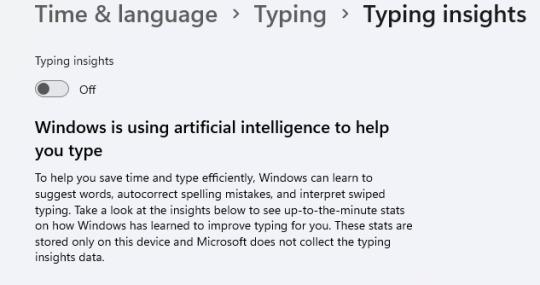

[ID: a screenshot of the above mentioned Windows 11 settings, showing that Typing Insights is now turned off, with the following description from Microsoft: 

"Windows is using artificial intelligence to help you type
To help you save time and type efficiently, Windows can learn to suggest words, autocorrect spelling mistakes, and interpret swiped typing. Take a look at the insights below to see up-to-the-minute stats on how Windows has learned to improve typing for you. These stats are stored only on this device and Microsoft does not collect the typing insights data." 

via novella-november

Generative AI, and especially AI that is used to "personalize" and track your activity across the web and on your computer are never going to be in your best interest, it is always going to serve these companies in whatever way will line their pockets the most, and all it takes is updating their terms of service once, and then all of that data they promised they weren't collecting suddenly all belongs to them.

via novella-november


0

If you have a fediverse account, you can quote this note from your own instance. Search https://mastodon.social/users/appassionato/statuses/115677891057819696 on your instance and quote it. (Note that quoting is not supported in Mastodon.)