HOW TO MOVE FROM WINDOWS TO LINUX:
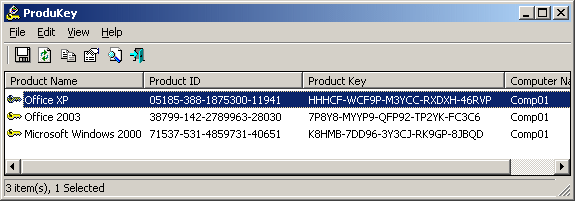
0. Extract your Windows license key with Produkey https://www.nirsoft.net/utils/product_cd_key_viewer.html You may need it later.
1. Pick a distro. Doesn't really matter, but see comments for 1000 suggestions and misleadingly excess complications and twiddles that nobody asked for. (Linux evangelists are the greatest drag on Linux adoption.)
Ubuntu and Mint are common starters. I use Xubuntu. Again, really doesn't matter.
The one thing I *do* suggest is: you pick one with a live USB. That way you can start the computer in your chosen distro and check all your hardware works before committing. Vital if you have any weird stuff. But almost all hardware just works these days. (Also, you can try various desktops to see what you like the look of.)
Nvidia is very unhelpful to Linux, so don't be surprised at issues. AMD is actively helpful and supportive, so if you have an AMD laptop or an AMD video card you should be very happy.
2. Install your distro that works.
3. Many programs will have Linux versions. If so, sweet! If not, a lot of the substitutes are excellent (e.g. LibreOffice).
4. Most Windows software works under Wine. If you use Steam, just install that for Windows games from Steam (it has its own separate version of Wine included).
5. Windows stuff that refuses to work under Linux? Set up VirtualBox and install Windows 10/11 using the product key you extracted in step 0. That way you can use That One Fucking App without having to use Windows the rest of the time.
6. The apps you need for real work are firmly Windows-only? YMMV of course, but I would set up a bad screen (Windows) for that work stuff and a good screen (Linux) for the rest of stuff. Separate work and play laptops are good mental hygiene in any case.




 になってた
になってた

 가온뉘
가온뉘 











 ふゆきまゆ
ふゆきまゆ


 bgl gwyng



 GENKI
GENKI




 GIGAZINE

![A forest filled in crisp winter air.
Overnight snow has turned the tree branches pure white, and the contrast between the blue sky reflected on the river’s surface and the pure whiteness of the snow is so beautiful.
(Peak District National Park, England)
[Japanese] 凛とした冬の空気に包まれた森。前の晩の雪で、木の枝は真っ白に。川面に映る空の青と雪の白さのコントラストが美しい。(イングランド、ピーク国立公園)](https://social-cdn.vivaldi.net/system/media_attachments/files/115/875/432/421/966/750/original/244148d2b85c20e6.jpeg)
 나나나나미
나나나나미







 @
@ @
@ @
@
 Ael Yokan
 (
(

 🦐
🦐